Coding Sahayi
Native WinUI 3 & .NET 8 • Local-First Autonomous IDE

Autonomous Coding Swarms. Zero Cloud Token Bills.

Stop burning $50–$100/mo on API tokens just for LLMs to hallucinate syntax errors. Coding Sahayi orchestrates specialized agent swarms locally over ConPTY pseudo-terminals, self-corrects broken unit tests autonomously, and continuously fine-tunes on your verified patches.

UI
WinUI 3
Runtime
.NET 8 / C#
Local AI
Ollama / LM Studio
Memory
EF Core + SQLite
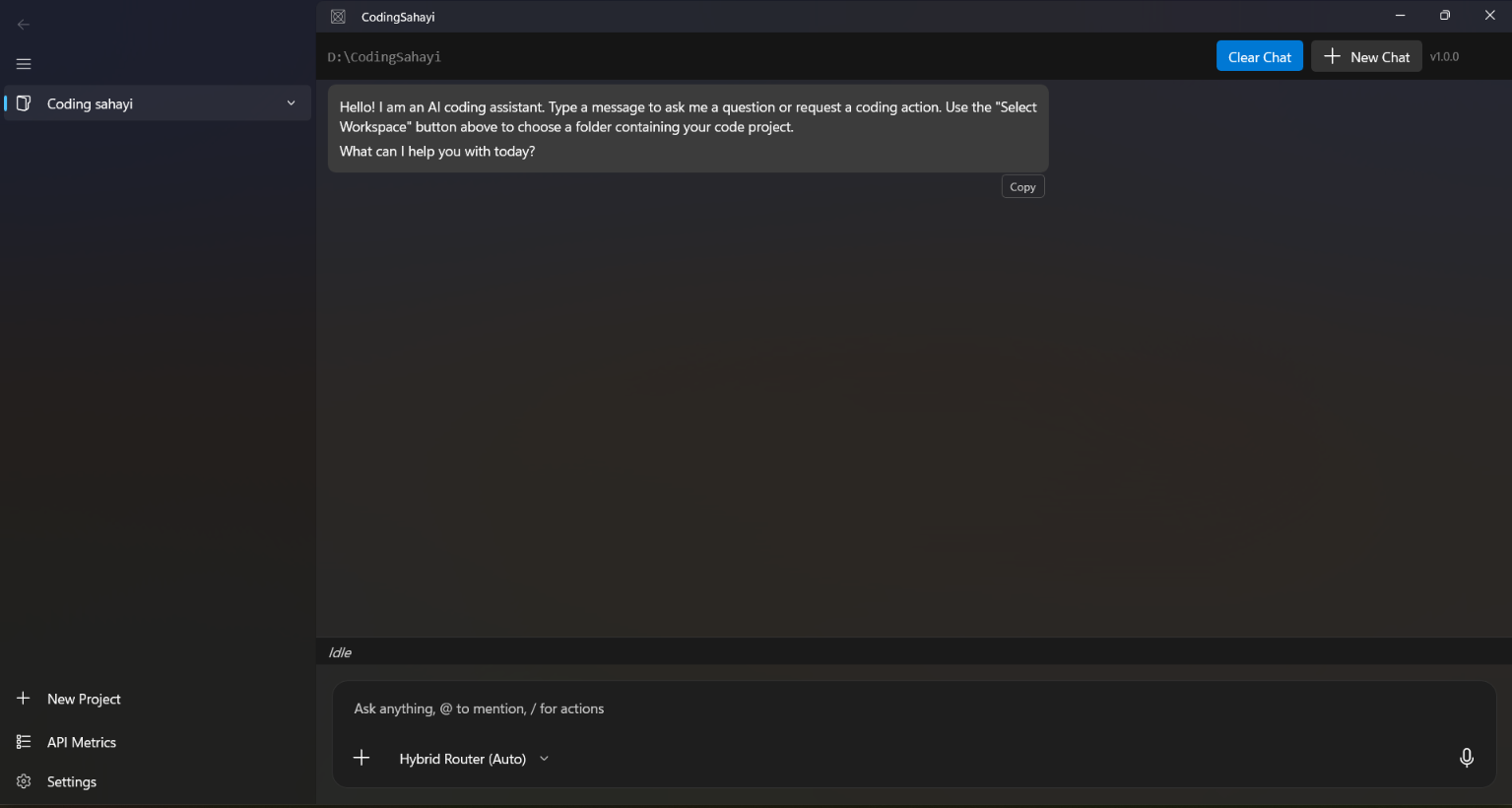
Coding Sahayi WinUI 3 Desktop Workspace
01 / Token economics

The expensive loop is the one that keeps repeating.

Sahayi moves the iteration loop onto the machine doing the work: inspect the repository locally, patch narrowly, compile, test, inspect the trace, and repeat without sending the workspace through a cloud meter.

The Old Way Cloud API Drain

Monolithic prompts + paid retries.

Entire repositories become prompt context. Failed compile attempts become paid token churn. Rate limits interrupt the loop, while the local workstation retains little durable learning.

Send broad repo context for each task
Pay per token for failed compile / test attempts
Rate limits and context-window pressure
No long-term local learning loop
The Sahayi Engine Zero-Cost Autonomy

Local execution + targeted context.

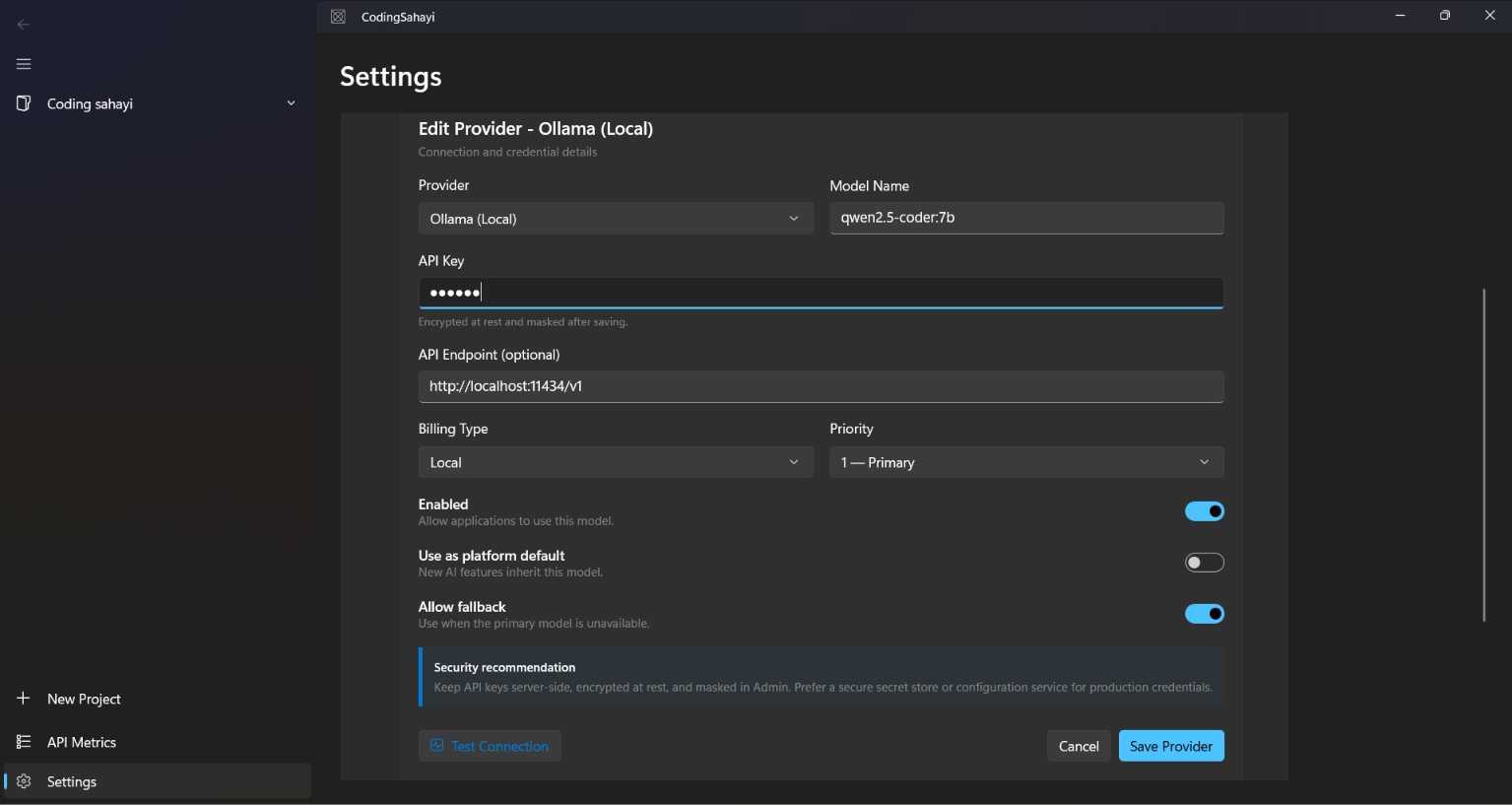
Keep inference, test feedback, and memory on the workstation. Direct HTTP completions point straight to port 11434 with zero key requirements.

Ollama Local Provider Configuration
100% private local execution via Ollama / LM Studio
Zero API fees or rate limits
02 / Architecture

A swarm is only useful when every agent owns a sharp boundary.

Four specialist roles form a closed execution loop. Planning, patching, verification, and memory stay distinct, reducing context drift and making each state transition observable.

01

Architect

Analyzes Roslyn AST syntax trees and project dependency graphs to plan atomic tasks before a line of implementation is touched.

Roslyn AST Dependency Graph Task Planning
02

Worker

Writes surgical code patches against the selected scope, keeping edits small enough to reason about and reducing context drift across files.

Patch-First Scoped Context C#
03

Critic

Spawns interactive Windows ConPTY terminals via Pty.Net, runs dotnet test, captures assertion stack traces in real time, and feeds failures back until the suite is green.

ConPTY Pty.Net dotnet test Stack Traces
04

Scribe

Commits working solutions to an EF Core SQLite memory bank, preserving verified patches as durable local experience for the training loop.

EF Core SQLite Verified Memory
01 / planAST + graphArchitect maps the atomic change.
02 / patchSurgical editWorker changes only the required scope.
03 / verifyConPTY feedbackCritic compiles and runs tests locally.
04 / rememberSQLite memoryScribe stores the verified outcome.
03 / Fine-tuning

Teach the local model from the work it already proved.

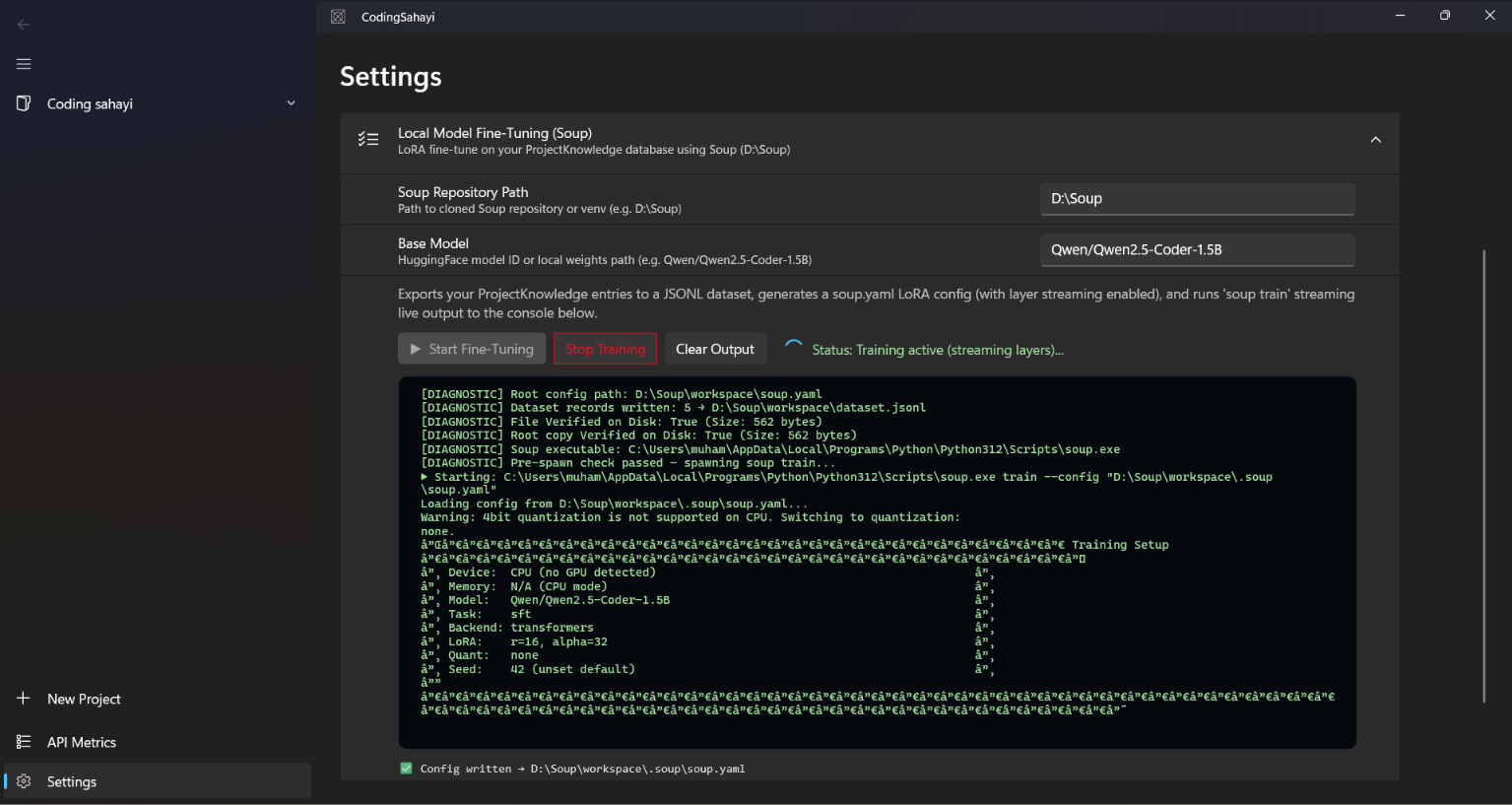
The training pipeline starts from verified IDE outcomes rather than a generic cloud corpus: successful patches, failures, and the resulting fixes become structured local data.

Powered by Soup CLI with Layer Streaming

Low-VRAM continuous adaptation for real developer hardware.

Credit to Alpamys Makazhan (@MakazhanAlpamys): Soup's layer-streaming approach makes LoRA fine-tuning of 8B models practical on 4 GB consumer NVIDIA laptop GPUs (CUDA enabled), while day-to-day inference runs universally on your machine via Ollama.

In-IDE Local Model Fine-Tuning Console
1
SQLite Memory Bank → verified coding episodes
2
JSONL Dataset → training-ready examples
3
Soup LoRA Layer Streaming → low-VRAM adaptation
4
Ollama GGUF Export → refreshed local inference
04 / Safety & visibility

Nothing important should disappear behind an agent.

Sahayi exposes the evidence behind an autonomous edit: inspect the proposed delta, watch the runtime signal, and keep the execution trace inside the IDE.

Δ

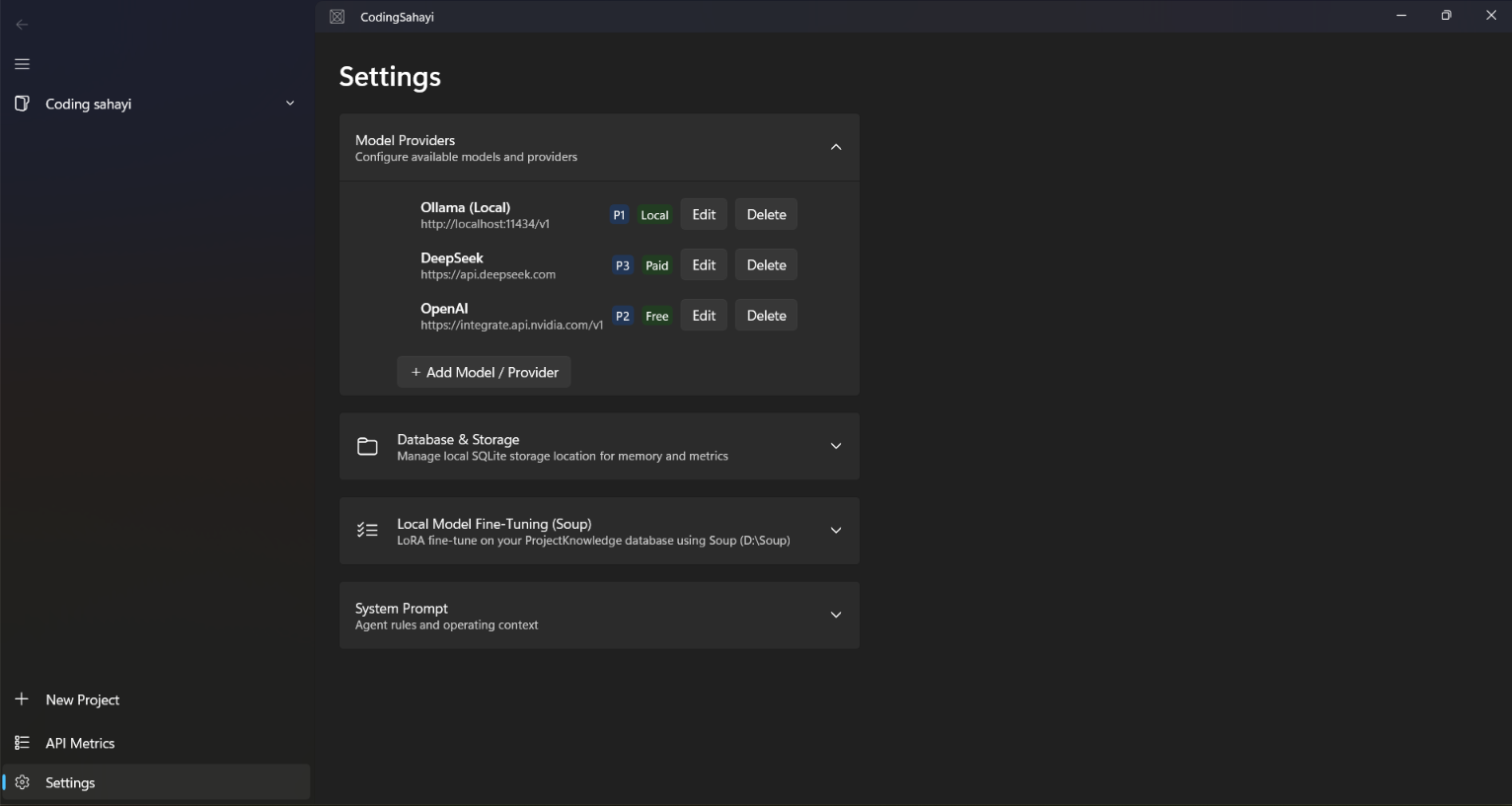
Provider Orchestration & Priority Ladder

Configure local and cloud providers with strict priority routing, custom endpoints, and encrypted credentials managed directly from the WinUI 3 interface.

Coding Sahayi Model Providers and Settings
Σ

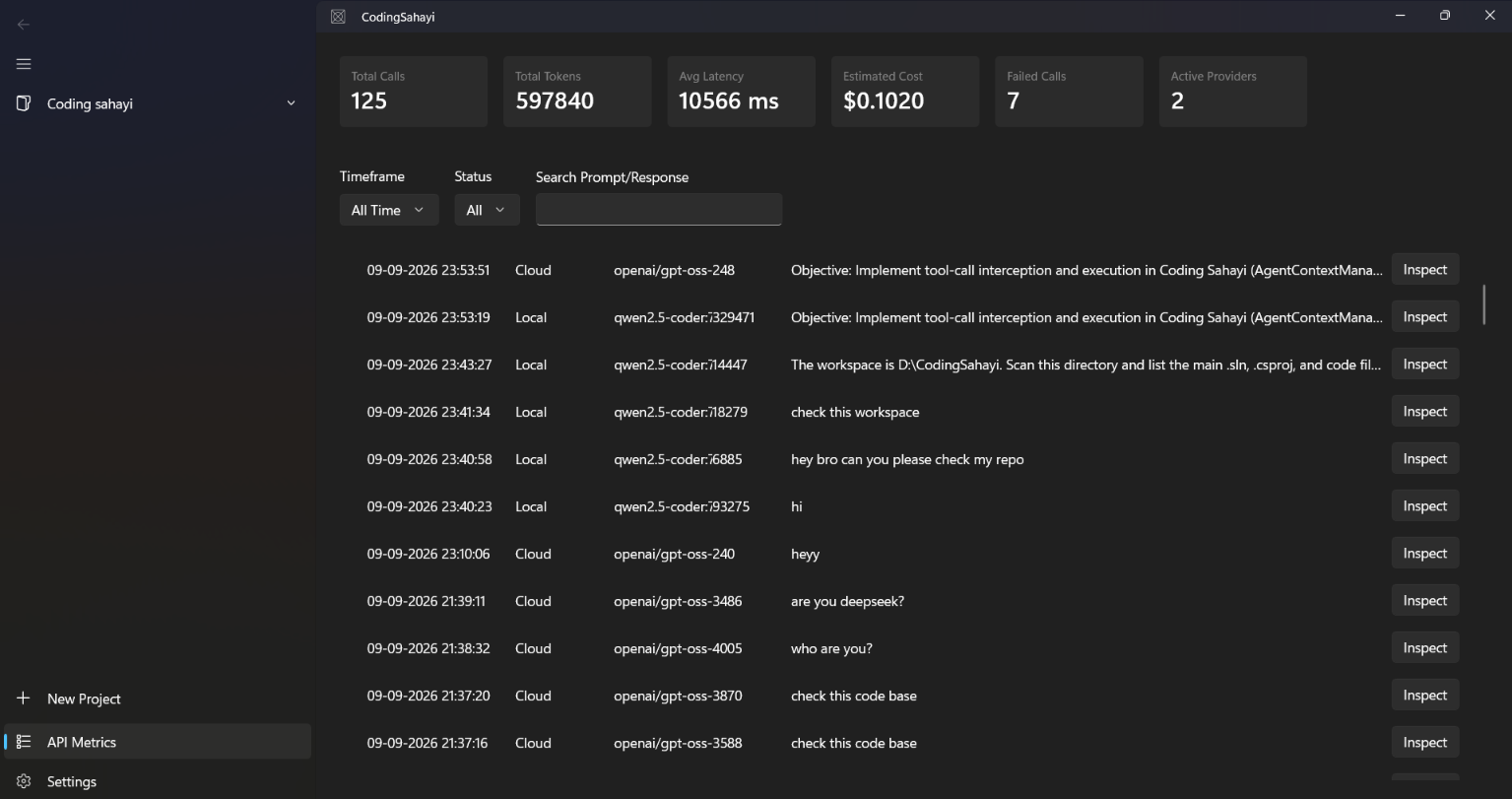
Real-time API Telemetry & Audit Dashboard

Monitor token usage, latency in milliseconds, status badges, and inspected raw logs while the swarm is active. The execution trail remains completely transparent.

Coding Sahayi API Metrics & Telemetry Dashboard
05 / Frequently asked

Direct answers about a local-first autonomous IDE.

Short, specific answers to the questions developers ask before running an autonomous agent against a real repository.

What is Coding Sahayi?

Coding Sahayi is a free, open-source, local-first autonomous coding IDE for Windows, built with WinUI 3 and .NET 8. It runs specialized agent swarms on your own machine, executes code through ConPTY pseudo-terminals, detects and repairs its own failing tests, and continuously fine-tunes a local model on the patches you approve.

Does Coding Sahayi send my source code to the cloud?

No. Coding Sahayi is designed local-first: inference runs through local providers such as Ollama or LM Studio, repository memory is stored locally in EF Core and SQLite, and fine-tuning happens on your own hardware. Your code and prompts stay on your machine.

Does Coding Sahayi require an API key or a paid subscription?

No. Coding Sahayi is free and MIT licensed, and it does not require a cloud API key or subscription. Because it uses local models, there are no per-token cloud charges. You do need a Windows machine with enough VRAM for the model you choose.

What is an autonomous coding swarm?

An autonomous coding swarm is a set of specialized agents that each own a narrow responsibility and cooperate on one task. Coding Sahayi uses four roles: an Architect that plans and decomposes the work, a Worker that writes the code, a Critic that reviews and challenges the result, and a Scribe that records the outcome. Narrow boundaries keep each agent's context small and its output verifiable.

How does the agent fix its own compiler and test failures?

Coding Sahayi runs builds and tests inside ConPTY pseudo-terminals and reads the real exit codes and output. When a test or compilation fails, that output is fed back to the swarm as evidence, which produces a targeted patch. The loop repeats until the suite passes or a configured retry limit is reached, and every proposed change is surfaced as a diff for review before it is applied.

Which local models and providers are supported?

Coding Sahayi orchestrates local providers including Ollama and LM Studio through a priority ladder, so you can rank which model handles which task and fall back automatically when one is unavailable. Any model exposed through those local endpoints can be used.

What is continuous fine-tuning in Coding Sahayi?

Continuous fine-tuning means the IDE exports the patches that were verified by a passing test suite into a training dataset and adapts a local model on that data. The model improves on patterns your own codebase has already proven correct, using low-VRAM training suitable for real developer hardware.

What are the system requirements for Coding Sahayi?

Coding Sahayi requires Windows 10 or Windows 11 and the .NET 8 runtime, since it is built with WinUI 3. A local model provider such as Ollama or LM Studio must be installed, and your available VRAM determines which model size you can run.
Muhammed Shabeer Creator & Architect
About the Developer

Muhammed Shabeer

Partner & CTO · Enterprise Solutions Architect
“Building an entire desktop IDE from scratch has been an intense learning curve, but seeing the agent catch its own compiler bugs and fix them autonomously makes the late nights worth it.”

Operating from Doha, Qatar. Directing enterprise software platforms, autonomous AI developer tools, and cross-border systems architecture.